Call sheet template for film, video & photo shoots
Free Call Sheet Maker & Template
Build a professional call sheet right here and download it as a PDF. Free for one shoot day and up to 25 crew — no account, no email gate.
Your sheet stays in your browser. We never see it.
Loading the call sheet maker…
What is a call sheet?
A call sheet is the one-page document a production sends to everyone working a shoot day: when to arrive (the call time), where to go, who else is there and how to reach them, what’s being shot and in what order, and what to do if something goes wrong. It’s the last thing that goes out the night before and the first thing a crew member reads in the morning.
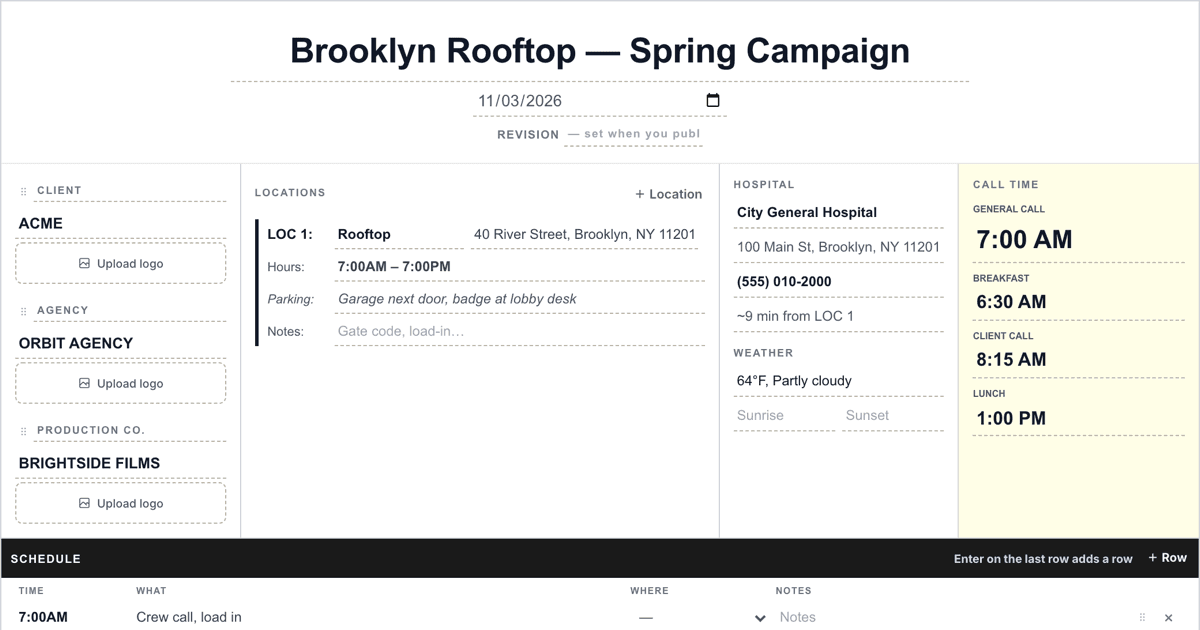
Every department reads it differently — camera checks the schedule, transport checks the addresses and parking, the 1st AD checks that every call time is right — so a good call sheet is dense, consistent, and laid out the same way every day. This is the anatomy the maker above follows:
- Title blockProject name, the shoot date, and the revision number if the sheet has been re-issued.
- LogosClient, agency and production company — so everyone knows whose shoot it is.
- LocationsEvery address for the day with hours, where to park, and load-in notes.
- Nearest hospital & weatherThe hospital closest to set with its phone number; the forecast, sunrise and sunset.
- Call timesGeneral crew call, breakfast, client call and lunch — the numbers people look for first.
- ScheduleThe day in order: what’s shooting, where, and roughly when.
- General notesClosed-set rules, embargoes, walkie channels, anything the whole unit must read.
- Production teamProducer, director, 1st AD, UPM and the emergency contact, with phones.
- Crew by departmentCamera, G&E, sound, art, wardrobe, hair & makeup… each person’s title, phone, email and call.
- Client, agency & talentWho’s coming from the client and agency side, plus talent with their agent and on-set time.
- FooterPhoto policy, confidentiality line, and the page count so nobody misses page two.
How to fill out a call sheet, step by step
Work top to bottom. Each step matches a section of the sheet above, and the panel beside the sheet switches sections on or off (switching one off keeps what you typed — it just doesn’t print).
- Name the project and set the date. Type the project name at the top and pick the shoot date. The date goes into the PDF’s title and filename.
- Add the locations. Add each address for the day with hours and parking. LOC 1 is your primary set; the nearest hospital sits beside it.
- Set the call times. General call first — every row defaults to it — then breakfast, client call and lunch. Give anyone who starts earlier or later their own call on their row.
- Build the schedule and notes. Add the day’s beats in order. Put must-read rules (closed set, no photos, embargo) in General Notes — they print in red.
- Add the production team and crew. Fill the production team, then add crew under each department with title, phone and email. Drag rows to reorder; hide any phone or email you don’t want printed.
- Add client, agency and talent. Switch those sections on in the panel beside the sheet. Talent rows carry an agent; you can keep the talent’s own contact off the crew copy.
- Download the PDF. Pick landscape or portrait and download. The sheet is fitted to one page where it can be. Send it the evening before — see below.
Who gets the call sheet, and when
Everyone working the day — crew, production team, talent (or their agent), and the client and agency people attending — gets the same sheet, so the whole unit is reading one set of times and addresses.
It goes out the evening before, once the next day’s times are confirmed: typically after wrap on a multi-day shoot, or a day ahead for a one-off. Send it as a PDF attachment so it opens on a phone at 5 a.m. without a login. If anything changes afterwards, re-issue the whole sheet with a revision number rather than emailing a correction — the revised sheet is the only one anyone should be holding.
Two privacy habits: keep talent’s personal phone and email off the copy that goes to the whole unit (print the agent instead — the maker has a switch for it), and only print client contacts the client has agreed to share.
Call sheet maker FAQ
Is the call sheet maker really free?
Yes. Build the sheet, add your logos, and download the PDF — no payment, no trial clock. The free maker covers one shoot day and up to 25 crew; a Runnel membership removes both limits.
Do I need an account or an email address?
No. There is no sign-up and no email gate: the download button works the moment the sheet is ready. Your sheet is saved in your own browser, not on our servers.
What are the limits — 25 crew and one day?
The free maker builds one shoot day with up to 25 crew members across every department (production team, client and agency contacts, and talent don’t count toward that). Multi-day shoots and bigger units are part of a Runnel membership, which also books the crew and sends their deal memos and W-9s.
Where is my call sheet stored? Can you see it?
In your browser only (localStorage). It never leaves your device — we don’t see the sheet or the names, phones and emails on it. Clearing your browser data clears it, so download the PDF when you’re done. The only thing the page tells us is that the tool was used, so we know it’s worth keeping.
Can I email the call sheet to my crew from here?
Not from the free maker — download the PDF and send it yourself. Runnel members publish from the same sheet: everyone on it gets an email with the PDF and a link that stays current when the sheet changes.
Can I export to Excel?
The free maker exports PDF only. Excel export is included with a Runnel membership.
Can I add my own logos?
Yes — client, agency and production company. PNG or JPEG up to 1 MB each. Logos are stored in your browser with the rest of the sheet and printed on the PDF.
When should a call sheet go out?
The evening before the shoot day, usually after wrap on the previous day once times are confirmed — early enough that crew can plan travel, late enough that nothing changes after it’s sent. If something does change, re-issue it with a revision number.
What’s the difference between this and Runnel?
This page is the call sheet on its own. Runnel is the workflow around it: book crew from your contacts, send deal memos, NDAs and W-9s to e-sign over secure links, and build the call sheet from the booked list — then publish it to everyone and wrap with a Certificate of Completion. Runnel is invite-only while it grows and free to start.
Crew still need deal memos & W-9s?
Runnel books your crew, sends deal memos, NDAs and W-9s to e-sign over secure links, and builds this call sheet from the booked list — then emails it to everyone on it.
Request an inviteInvite-only while we grow · free to start · no credit card.